
How to check in and unlock the door
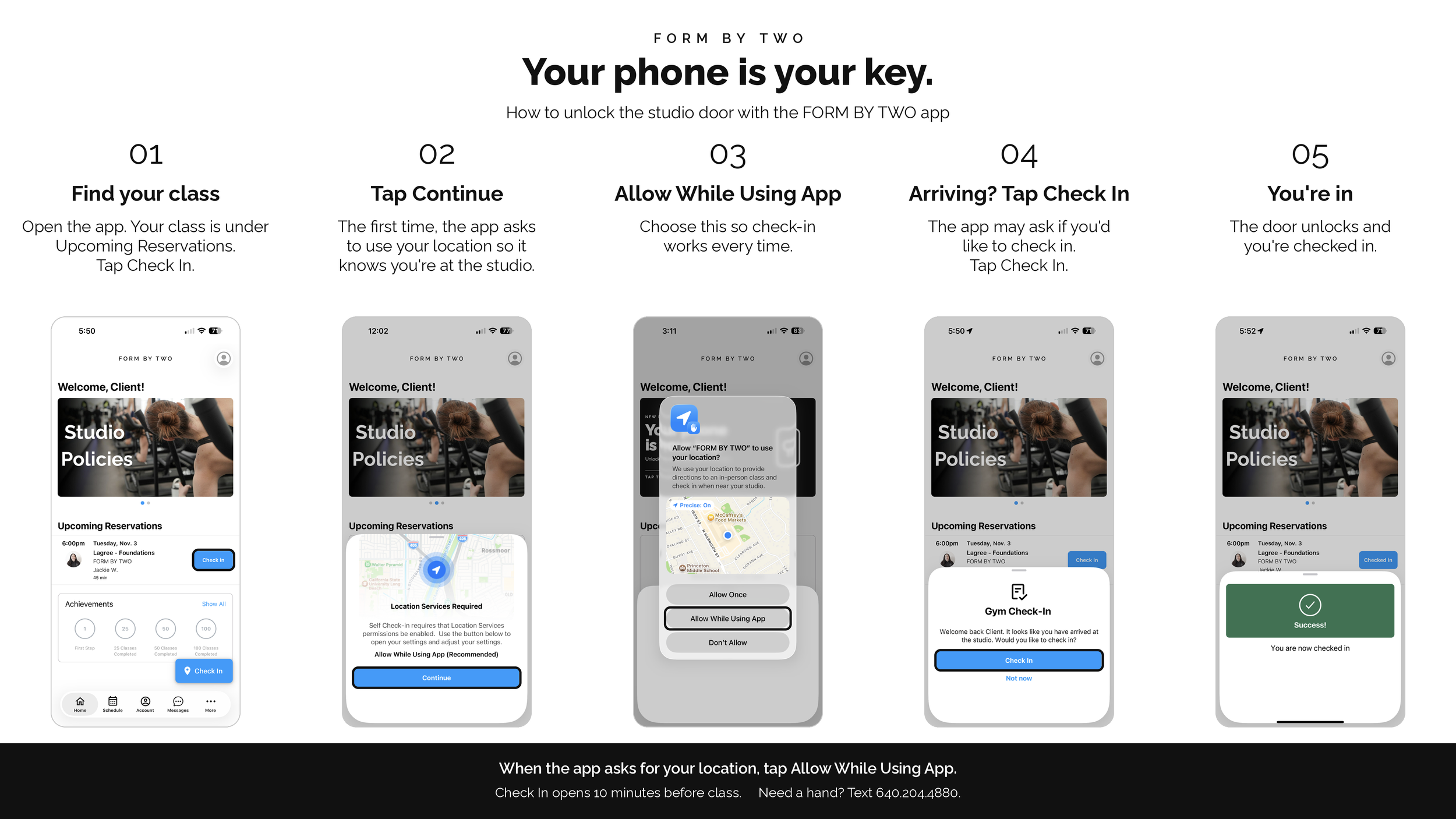
Open the FORM BY TWO app. Sign in with the same account you use to book.
Find your class. It's under Upcoming Reservations on the Home screen. Tap Check In.
Allow your location. The first time, the app asks to use your location so it knows you're at the studio. Tap Continue, then choose Allow While Using App.
Tap Check In when you arrive. The app may ask if you'd like to check in. Tap Check In.
You're in. The door unlocks and you're checked in.
Good to know
Check In opens 10 minutes before your class.
If the door is locked, the app is how you'll get in.
Check in through the app. Website check-ins won't open the door.
Don't see the Check In button? Update the app, make sure location is set to Allow While Using App, and check that you're booked into today's class.
Booked through Wellhub?
You'll need the FORM BY TWO app to get in.
Download the FORM BY TWO app.
Sign in or create an account with the same email you use for Wellhub.
Book on Wellhub as usual. Your class will show up in our app, and you can tap Check In starting 10 minutes before class.
Get the FORM BY TWO app


Our Android app downloads directly from our booking partner rather than the Google Play Store, so your phone may ask you to allow the install. Just follow the prompts.
Class attendance and punctuality
New Clients: Please arrive 10 minutes before class begins to ensure you receive an introduction to the studio and equipment. If you are not present five minutes before class begins, we are unable to allow entry to that class, and you will be rebooked. This is to ensure your safety and that you understand the machine before the class begins.
All Other Clients: We have a strict 5-minute grace period for all class attendees. If you arrive more than 5 minutes late to the scheduled start time, you will not be permitted to enter the studio, and the class will be marked as a late cancellation. Thank you for helping us start classes on time.
Finding us
FORM BY TWO, 301 North Harrison Street, Suite 260, Princeton Shopping Center, Princeton, NJ 08540.
Park behind Princeton Shopping Center. Our entrance faces the parking lot, between Rita's and Princeton Nassau Pediatrics.
Frequently Asked Questions
Why does the app need my location? It confirms you're at the studio before the door unlocks. Choose Allow While Using App so check-in works every time.
Can I check in on the website? No. Website check-ins won't open the door, so please use the app.
What if I get there early? Check In opens 10 minutes before your class, so wait until you're within that window to tap it.
What if I'm running late? Our 5-minute grace period still applies. If you arrive more than 5 minutes after class starts, you won't be able to enter, and the class will be marked as a late cancellation.
What if something isn't working? Text us at 640.204.4880 and we'll help you get in.
Need a hand?
Text or call us at 640.204.4880. We're happy to walk you through it on your next visit.